
Start with the split playoff plan
Use separate regular-season and playoff divisions when the league does not move straight from one standings table into one bracket. This is common when East and West divisions, age groups, skill groups, or facility pods feed playoff divisions such as Gold and Silver.
If you need the simpler playoff workflow first, use How to Run a League With Playoffs. If you still need standings confirmation and seeding basics, keep How to Manage League Standings and Playoff Seeding open. If the weekly schedule is not built yet, start with How to Schedule a Multi-Week Sports League.
The example uses an indoor soccer league with East and West regular-season divisions. The top two teams from each regular-season division feed Gold Playoffs, and each third-place team feeds Silver Playoffs.
Before you configure the league, decide:
- Which regular-season divisions teams start in.
- Which playoff divisions teams can land in.
- How many placements from each regular-season division should be mapped.
- Whether every regular-season division uses the same placement rules.
- Which playoff matches belong on which fields and dates.
- What teams should see publicly before playoff week starts.
BracketIQ keeps this workflow connected: division setup defines the placement rules, teams stay assigned to regular-season divisions, scores feed standings, confirmed standings populate playoff matches, and the public page shows the bracket without organizer controls.
Map regular-season placements to playoff divisions
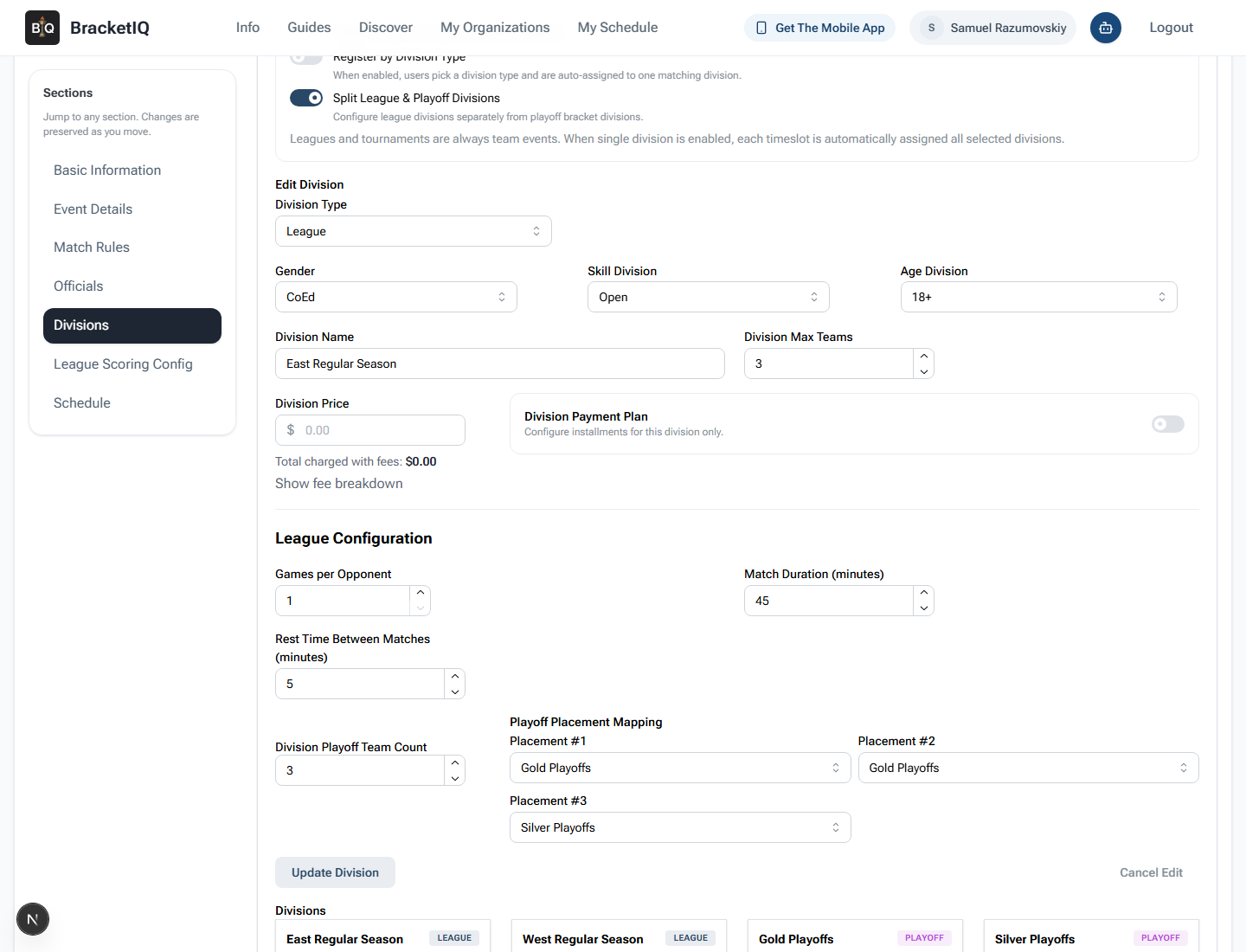
Open the league in Manage mode, go to Details, open Divisions, and turn on Split League & Playoff Divisions. Edit each regular-season division and set the playoff placement mapping.
For this league:
Single Divisionis off because teams start in East and West.Split League & Playoff Divisionsis on.- East Regular Season allows three playoff placements.
- Placement 1 maps to Gold Playoffs.
- Placement 2 maps to Gold Playoffs.
- Placement 3 maps to Silver Playoffs.
- West Regular Season should use the same mapping.
- Gold Playoffs has room for four teams.
- Silver Playoffs has room for two teams.
The capacity math matters. If East sends two teams to Gold and West sends two teams to Gold, Gold needs four team slots. If each regular-season division sends one team to Silver, Silver needs two team slots. Fix those counts before standings are confirmed so the playoff handoff is predictable.
Review team assignments by regular-season division
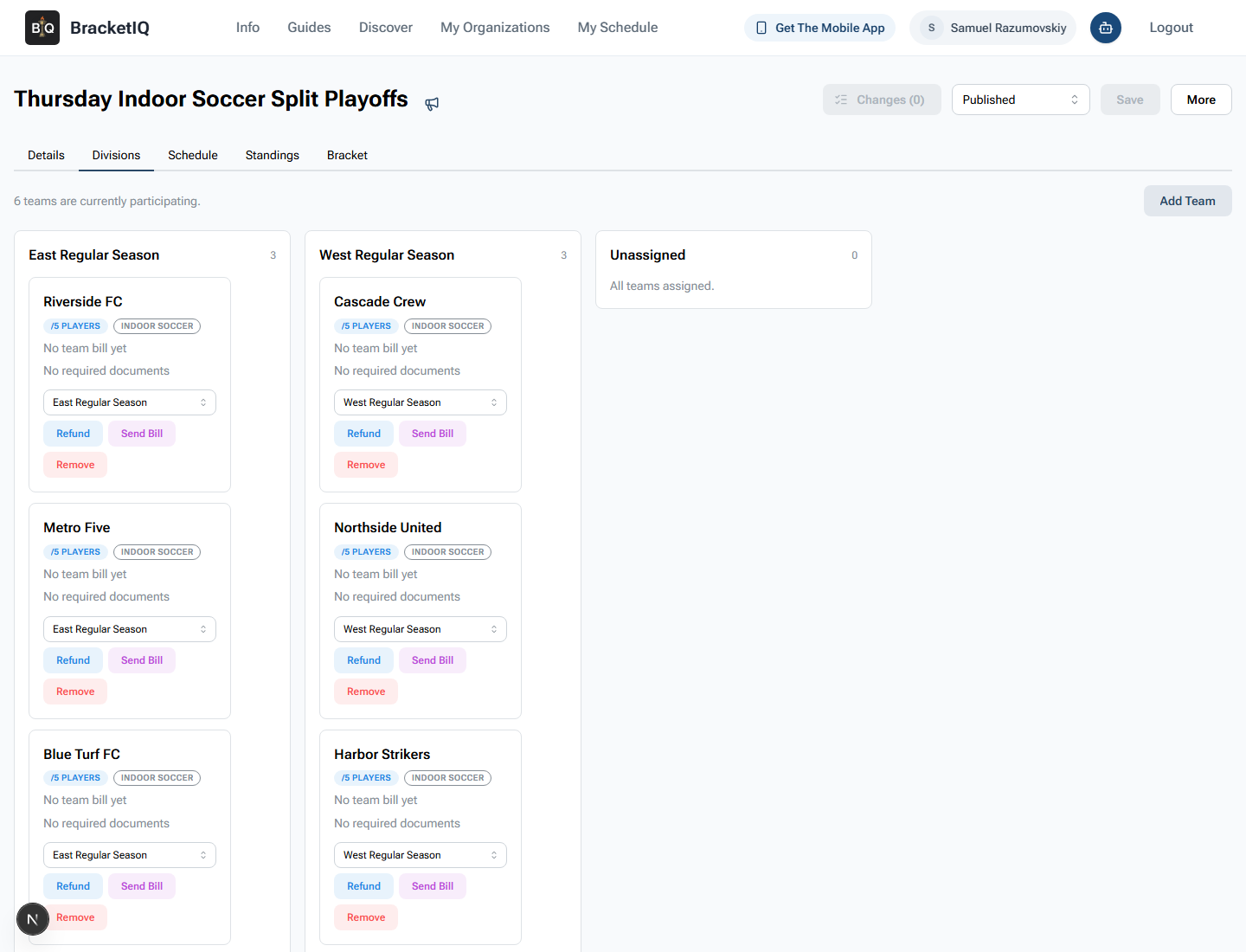
Open the Divisions tab and review the team columns before the playoff cutoff. This is the operational check that prevents a team from being seeded from the wrong regular-season table.
Check:
- The total number of participating teams.
- Which teams are in East Regular Season.
- Which teams are in West Regular Season.
- Whether any team is unassigned.
- Whether any team needs a bill, document, roster, refund, or eligibility follow-up.
- Whether late teams should still be allowed to join before playoffs.
In this example, Riverside FC, Metro Five, and Blue Turf FC are in East. Cascade Crew, Northside United, and Harbor Strikers are in West. The Unassigned column is empty, which means every playoff seed will come from a known regular-season division.
Review the playoff schedule in Agenda view
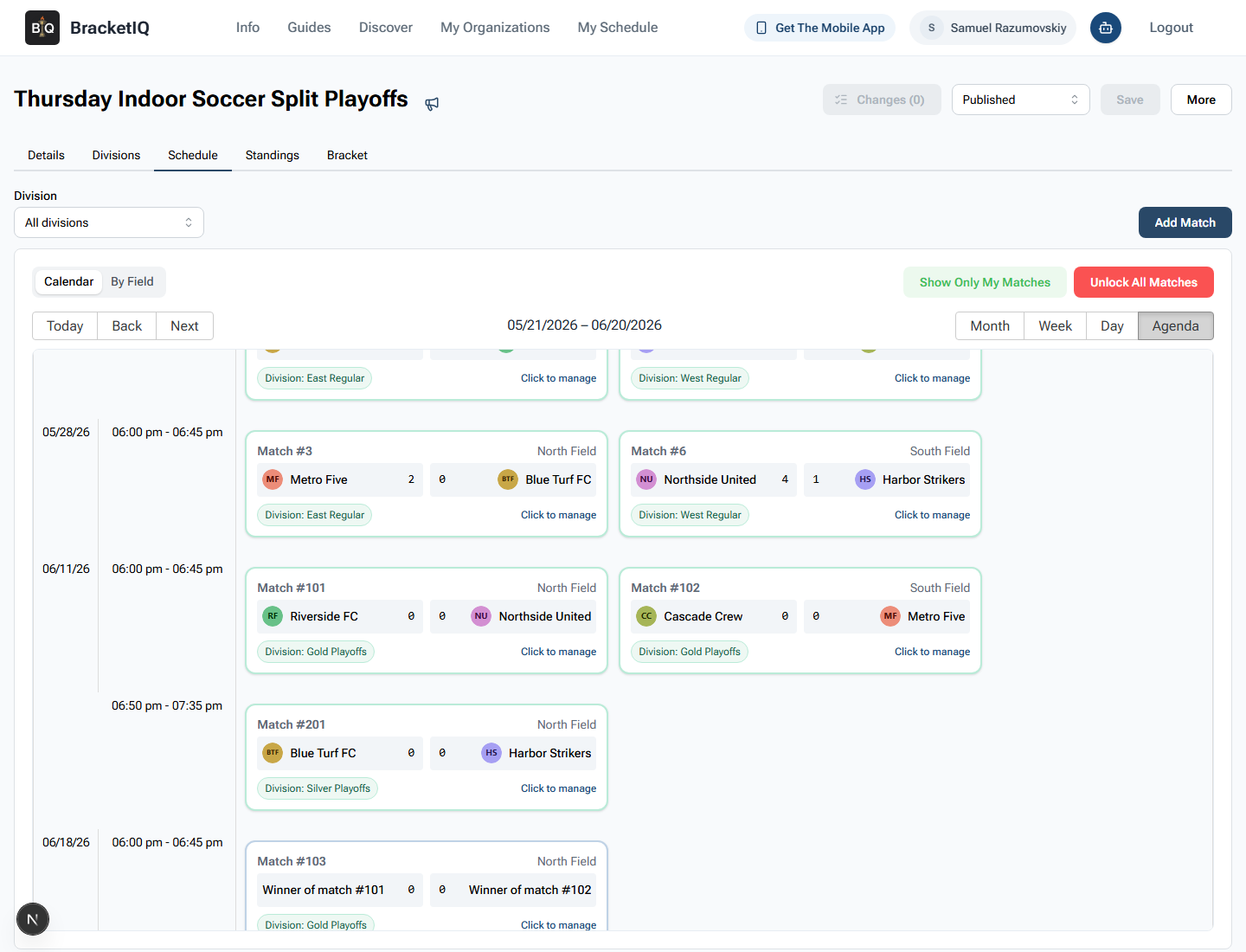
Open Schedule and switch to Agenda view. The split workflow is easier to audit in Agenda view because regular-season matches, Gold playoff matches, Silver playoff matches, fields, and times appear in one ordered list.
Review:
- Final regular-season matches are listed before playoff matches.
- Gold semifinals are scheduled on the correct date.
- Silver Playoffs has its own match.
- The Gold final is scheduled after semifinal winners can be known.
- Field assignments match staff coverage.
- Teams can understand the timeline without a separate spreadsheet.
In this example, the Gold semifinals and Silver playoff match are on June 11, 2026, and the Gold final is on June 18, 2026. That gives staff a clear transition from regular-season results into playoff operations.
Confirm standings for each regular-season division
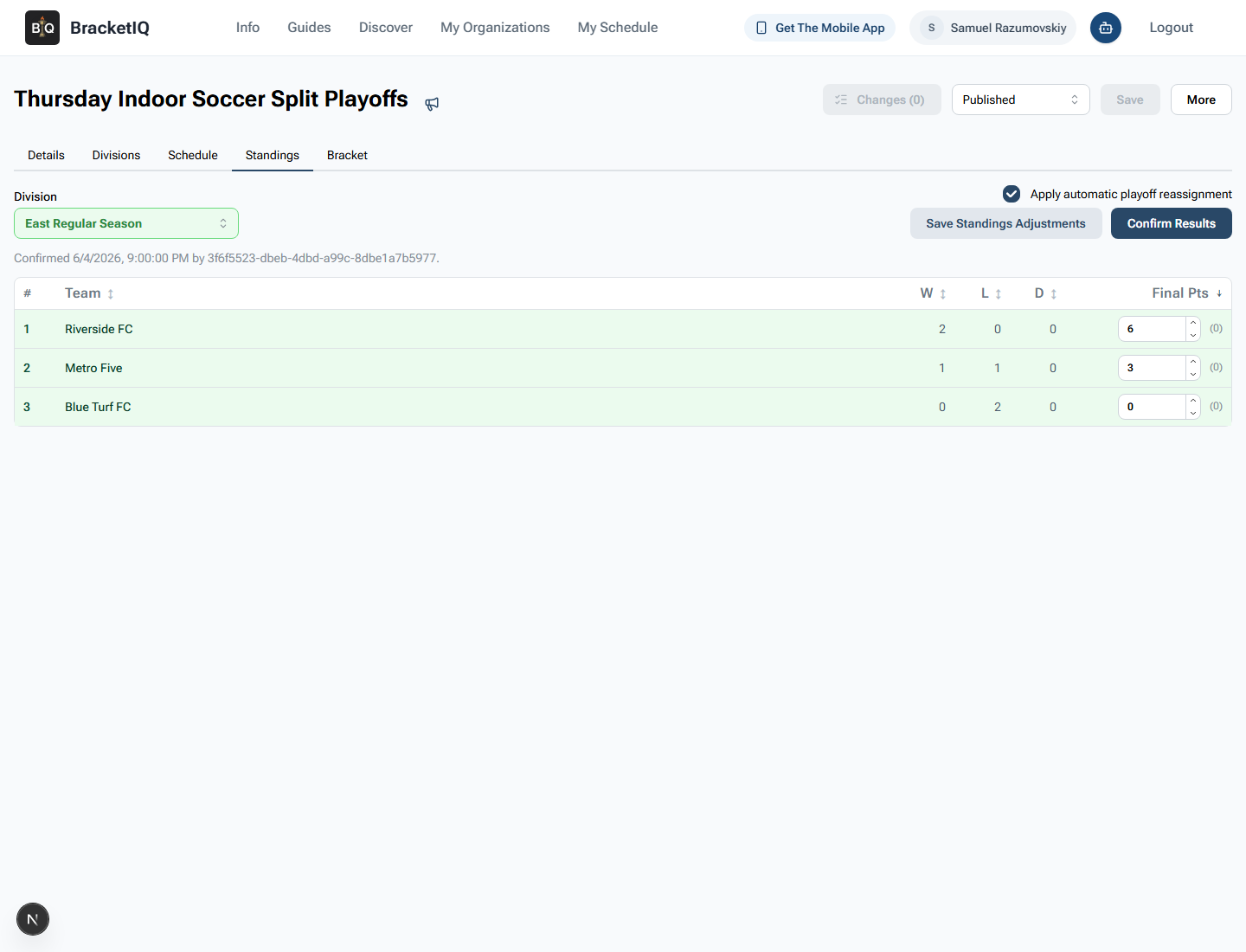
Open Standings and select the regular-season division you want to review. Confirm each regular-season division separately because each one has its own placement mapping.
For each division:
- Confirm the division selector is on the correct regular-season division.
- Check wins, losses, draws, and final points.
- Save any intentional final-points adjustments before confirming.
- Keep
Apply automatic playoff reassignmenton when BracketIQ should place teams into playoff matches. - Click
Confirm Resultsonly after the standings match your league rules.
Here, Riverside FC and Metro Five feed Gold Playoffs from East, while Blue Turf FC feeds Silver Playoffs. Repeat the same check for West before relying on the playoff schedule.
Verify the Gold playoff bracket
Open Bracket after the regular-season standings are confirmed. BracketIQ should show the qualified Gold teams in the bracket matches.
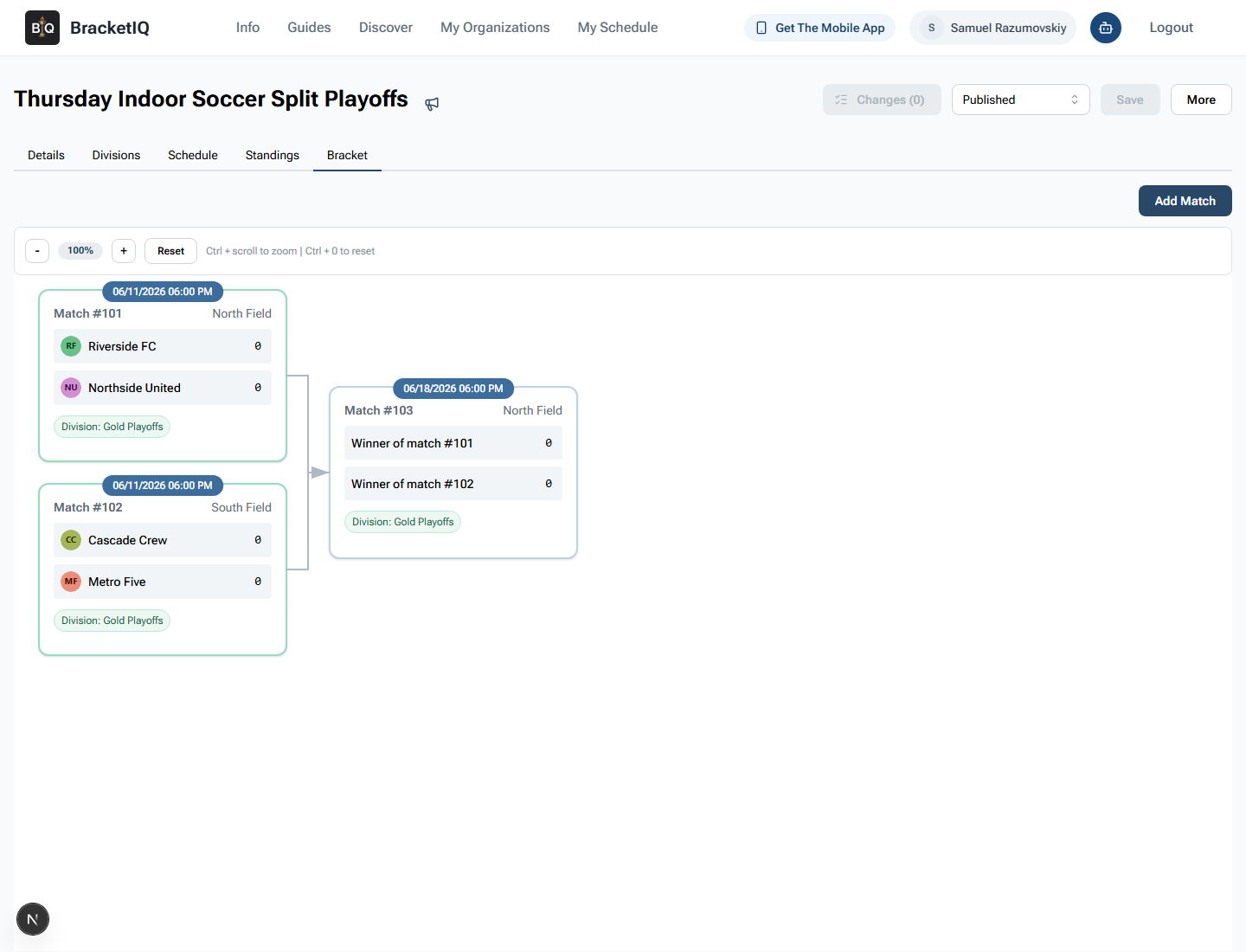
Check:
- Gold Playoffs includes the expected teams from both regular-season divisions.
- The semifinal matchups match the placement rules.
- The final uses winner placeholders until semifinal scores are entered.
- Match numbers, dates, times, and fields match the Agenda schedule.
- The bracket can be used as the source of truth for playoff score entry.
If a team is missing or seeded into the wrong playoff division, go back to Standings. Fix the score, standings adjustment, or placement mapping, confirm results again, and recheck the bracket.
Check the participant-facing playoff view
Open the participant-facing bracket view after the organizer bracket is correct. This is the version teams, captains, parents, and players will rely on.
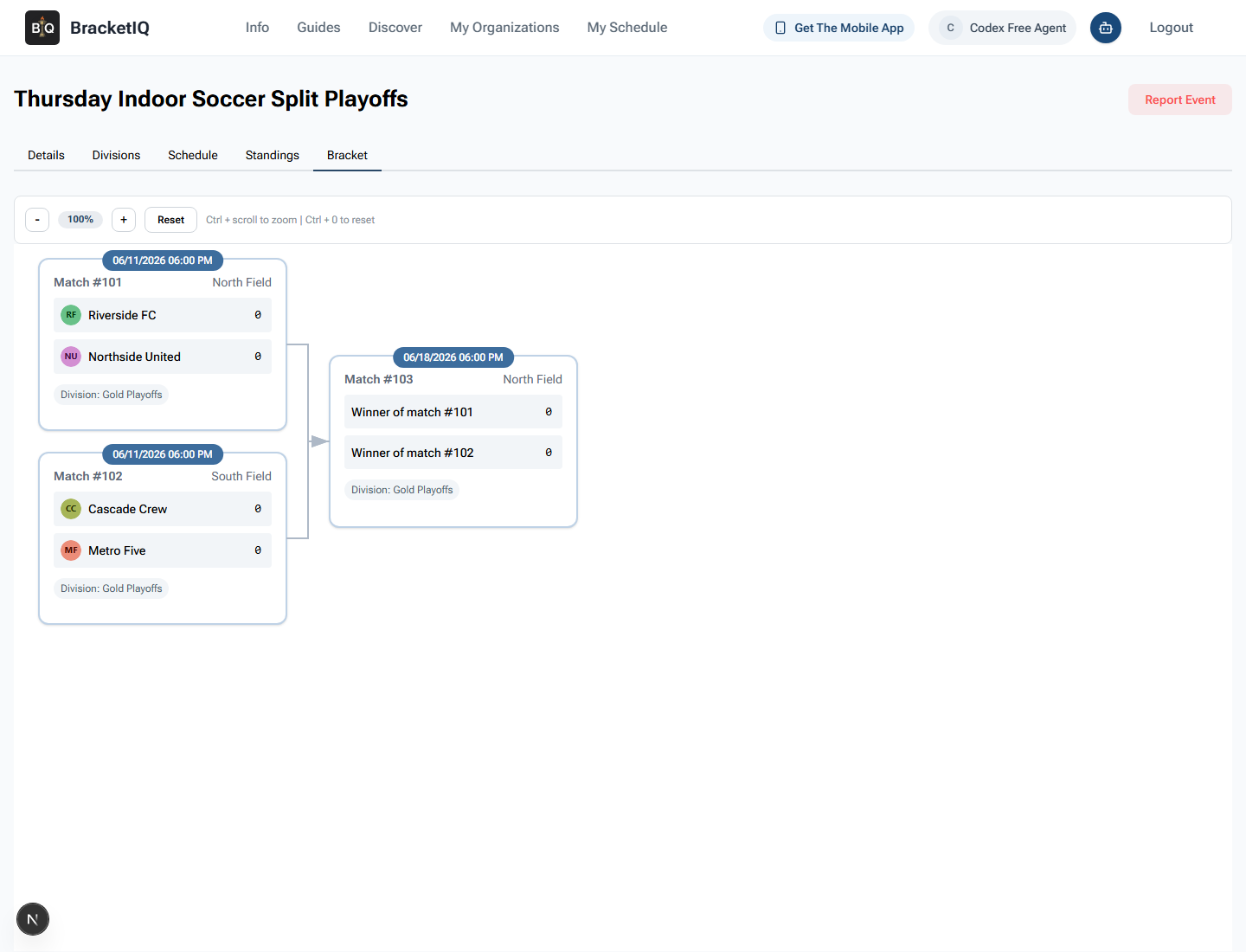
Check that participants can see:
- The correct playoff division label.
- The correct semifinal teams.
- The date, time, and field for each playoff match.
- Winner placeholders for future rounds.
- No organizer-only controls such as
Add Match.
For split playoffs, also tell teams how Silver Playoffs will appear in the schedule if the Silver side is a single match instead of a connected bracket. The goal is not just that the organizer view is right. The goal is that teams know where to find their next match without asking staff for another screenshot.
Split league playoff checklist
Use this checklist before playoff week:
- Turn on split league and playoff divisions.
- Create the regular-season divisions.
- Create the playoff divisions.
- Set playoff capacity for each playoff division.
- Map each regular-season placement to the correct playoff division.
- Review teams in the Divisions tab before the cutoff.
- Use Agenda view to check the playoff timeline.
- Confirm standings for every regular-season division.
- Keep automatic playoff reassignment on when BracketIQ should seed matches.
- Verify the Gold bracket and any other connected playoff bracket.
- Confirm single-match playoff divisions in Agenda view.
- Check the participant-facing page before sharing the bracket.
Separate playoff divisions add flexibility, but they also add one extra handoff: placement rules. BracketIQ keeps that handoff inside the league instead of forcing staff to copy standings into a separate bracket tool.