
Start from a league that is ready to open registration
This guide starts after the basic league has already been created. If the season is not built yet, start with How to Create a League in BracketIQ, then come back here when the league details, dates, fields, and divisions are ready to review.
The example uses a paid Thursday indoor soccer league with team registration, but the same registration workflow works for volleyball, pickleball, basketball, tennis, hockey, baseball, football, outdoor soccer, and other recreational sports.
Before you share the registration link, decide:
- How captains should register full teams, and whether players without a team should have a free-agent path.
- How many teams the league can accept.
- Which division teams should enter.
- Whether team registration is free or paid.
- How long before the season starts registration should close.
- Whether refunds are allowed before a cutoff.
- Whether players without a full team should join as free agents.
- How organizers will review registered teams before scheduling.
BracketIQ keeps those decisions connected to the league details, public registration page, captain team-selection flow, participant list, billing actions, and future league management.
Confirm the league registration settings
Open the league in Manage mode, go to Details, and expand Event Details. Confirm that the event is a league and that team registration is enabled.
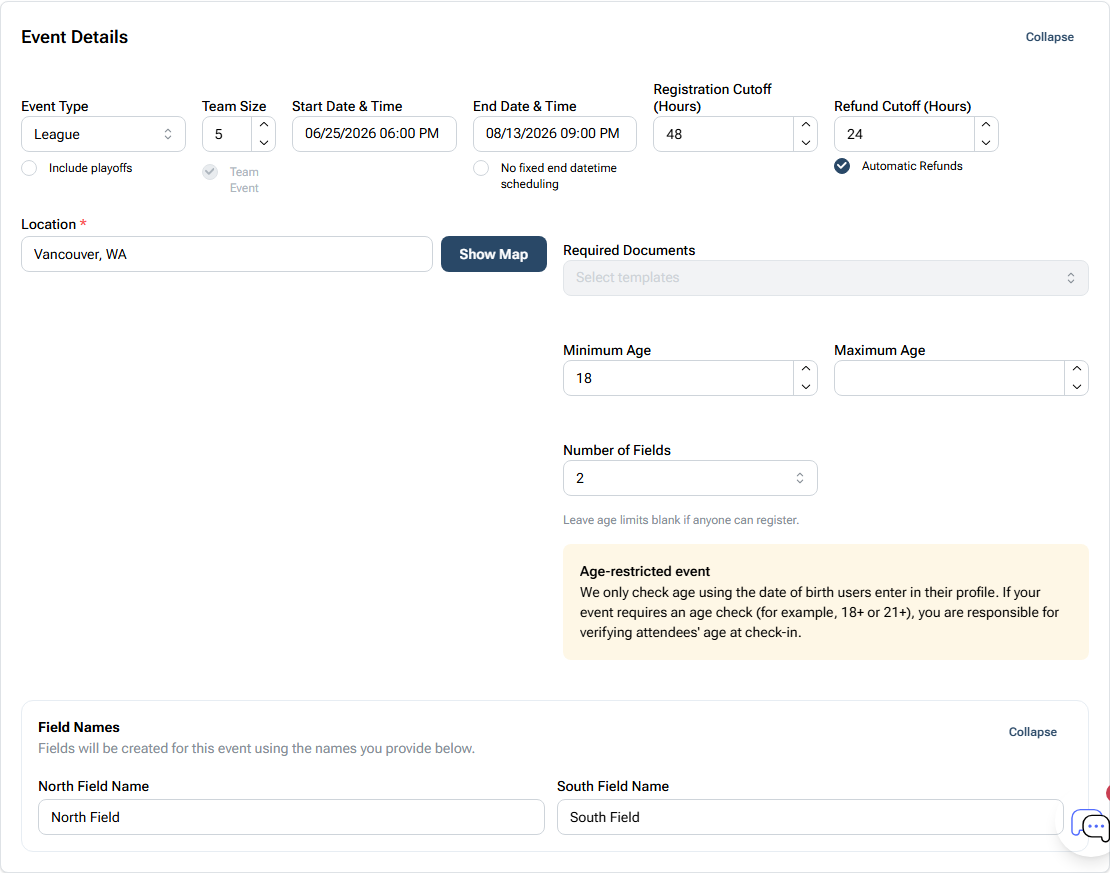
For this example, the important settings are:
- Event Type:
League - Team Size:
5 - Team Event: enabled
- Start Date & Time:
06/25/2026 06:00 PM - End Date & Time:
08/13/2026 09:00 PM - Registration Cutoff:
48hours before start - Refund Cutoff:
24hours before start - Automatic Refunds: enabled
- Minimum Age:
18 - Number of Fields:
2 - Field names:
North FieldandSouth Field
Team size sets the expectation captains see before they register. The registration cutoff gives staff time to review teams, bills, rosters, and free-agent interest before the season schedule becomes hard to change.
If the league requires waivers or other documents, add them before sharing the registration link. That keeps captains and players from registering first and discovering paperwork later.
Set the division capacity and price
Open Divisions after the event-level registration settings look right. A league can use one division or several divisions, but every registered team needs a capacity, price, and division destination.
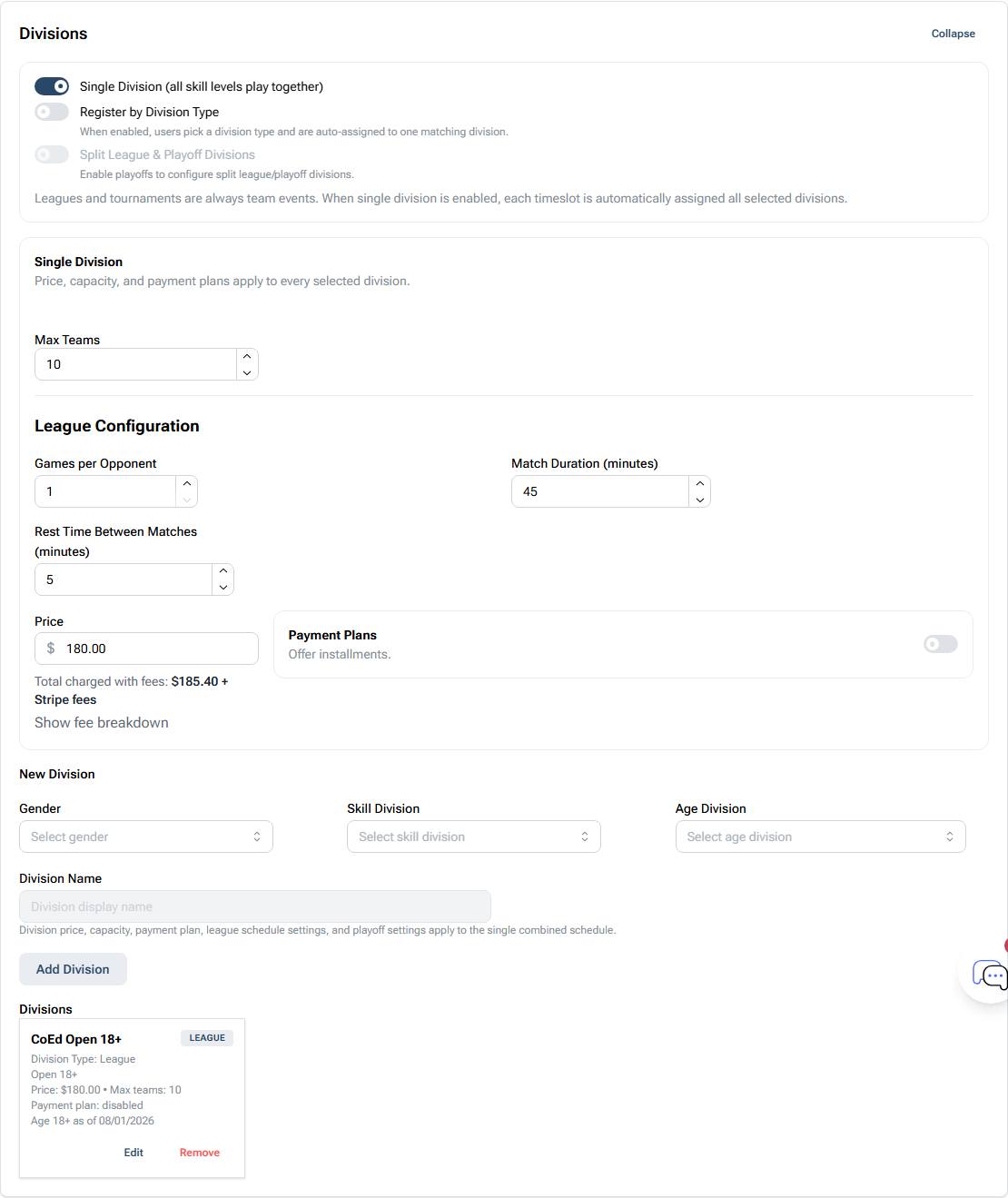
For the indoor soccer example:
- Single Division is enabled.
- Register by Division Type is off because there is one division.
- Max Teams is
10. - Games per Opponent is
1. - Match Duration is
45minutes. - Rest Time Between Matches is
5minutes. - Price is
$180.00. - Payment Plans are disabled.
- The saved division is
CoEd Open 18+.
Set price and capacity before opening registration. If you change those after captains have joined, you may need to explain the change, send bills manually, remove teams, or clean up registrations that were created under the old settings.
For paid registration, the public page shows the team entry price and BracketIQ can route captains toward checkout. If you want to review the payment presentation first, the paid pickup event guide shows how BracketIQ presents fees and checkout in a simpler event format.
Review the public registration page
After registration settings are saved, open the participant-facing league page. This is the page captains and players use before they register.
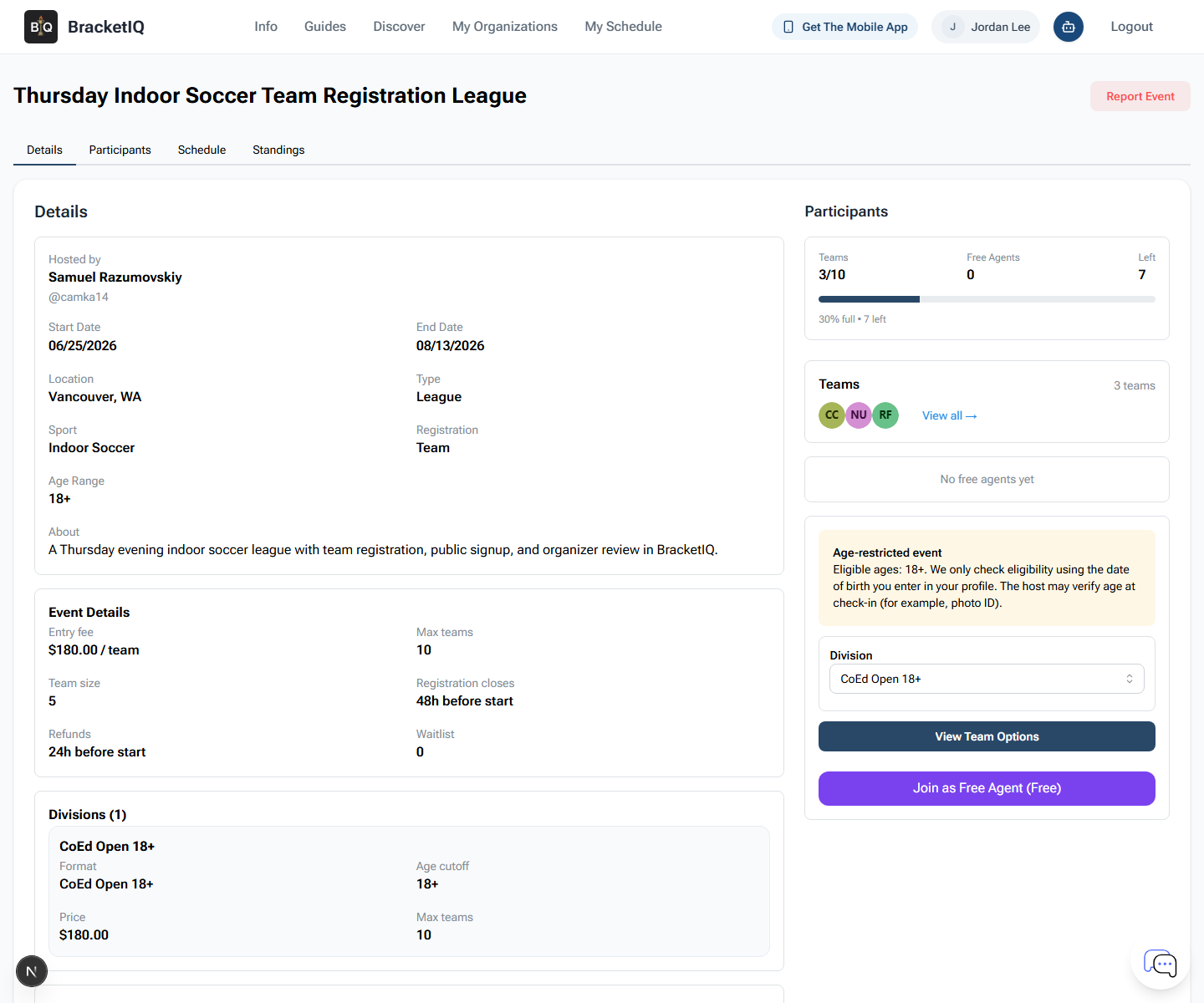
Check the player-facing details:
- Entry fee is
$180.00 / team. - Max teams is
10. - Team size is
5. - Registration closes
48h before start. - Refunds are available
24h before start. - The visible division is
CoEd Open 18+. - The league shows
3/10teams currently registered. View Team Optionsis available for captains.Join as Free Agent (Free)is available for players without a team.
This step catches the registration mistakes captains will notice first. If the public page has the wrong price, capacity, age range, date, or division, fix the league before sending the link.
Show captains the team path
Click View Team Options to confirm the captain flow. Captains should be able to select a team they manage, confirm the division, and see the correct join amount before checkout.
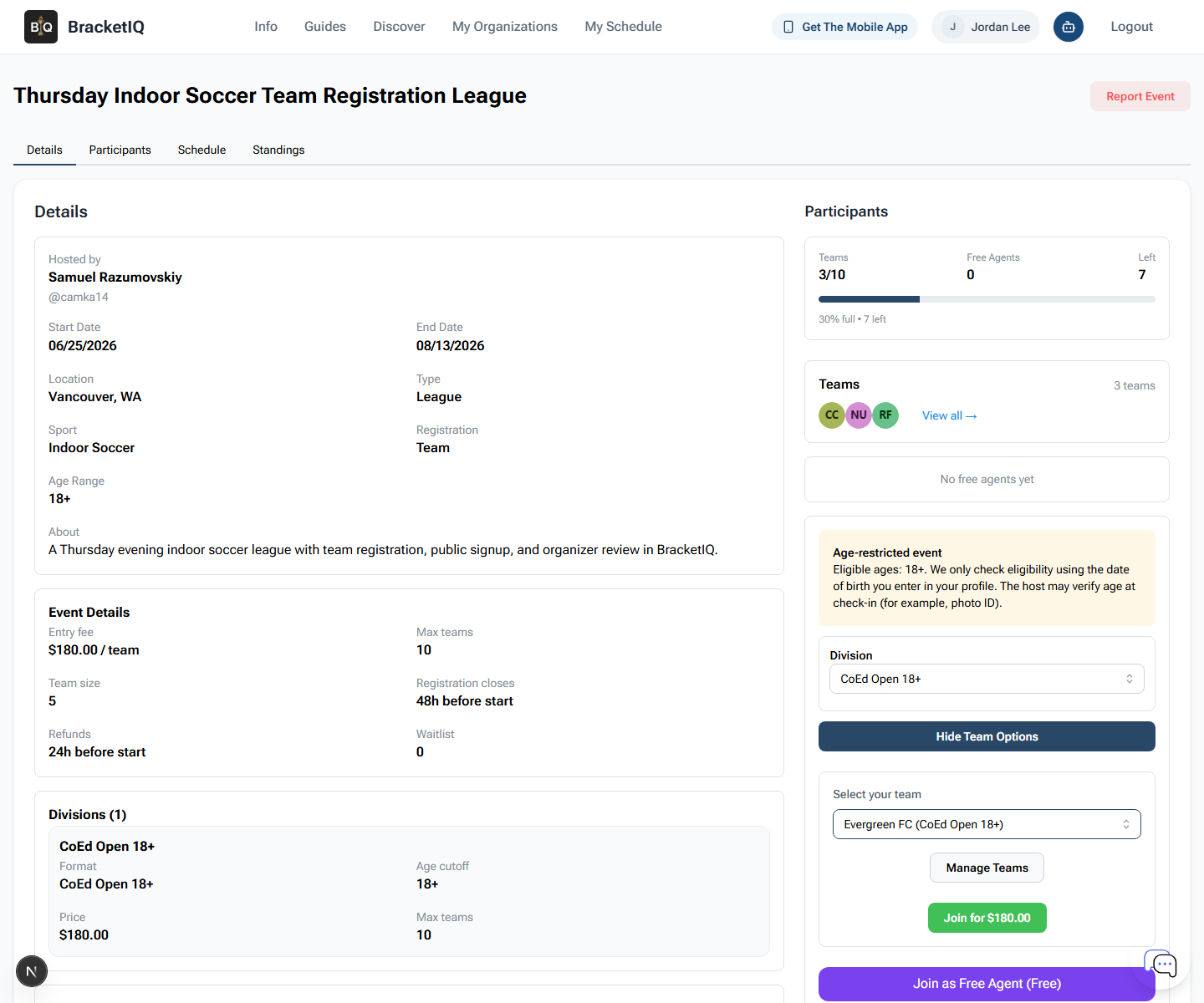
In this example, the captain selects Evergreen FC (CoEd Open 18+), and the join button shows Join for $180.00.
Use this check to confirm:
- Captains can find the correct managed team.
- The selected team has the right sport and division.
- The paid join button shows the expected amount.
- The Manage Teams button gives captains a place to create or update a team before registering.
- Players without a full team can still use the free-agent path when you want to collect interest.
Do not assume every player understands the team workflow. When you share the link, add a short note such as: "Captains should create or select their team before completing registration. Players without a team can join the free-agent list."
Monitor registered teams
Once registration opens, use the organizer Participants tab to review the teams that are actually participating.
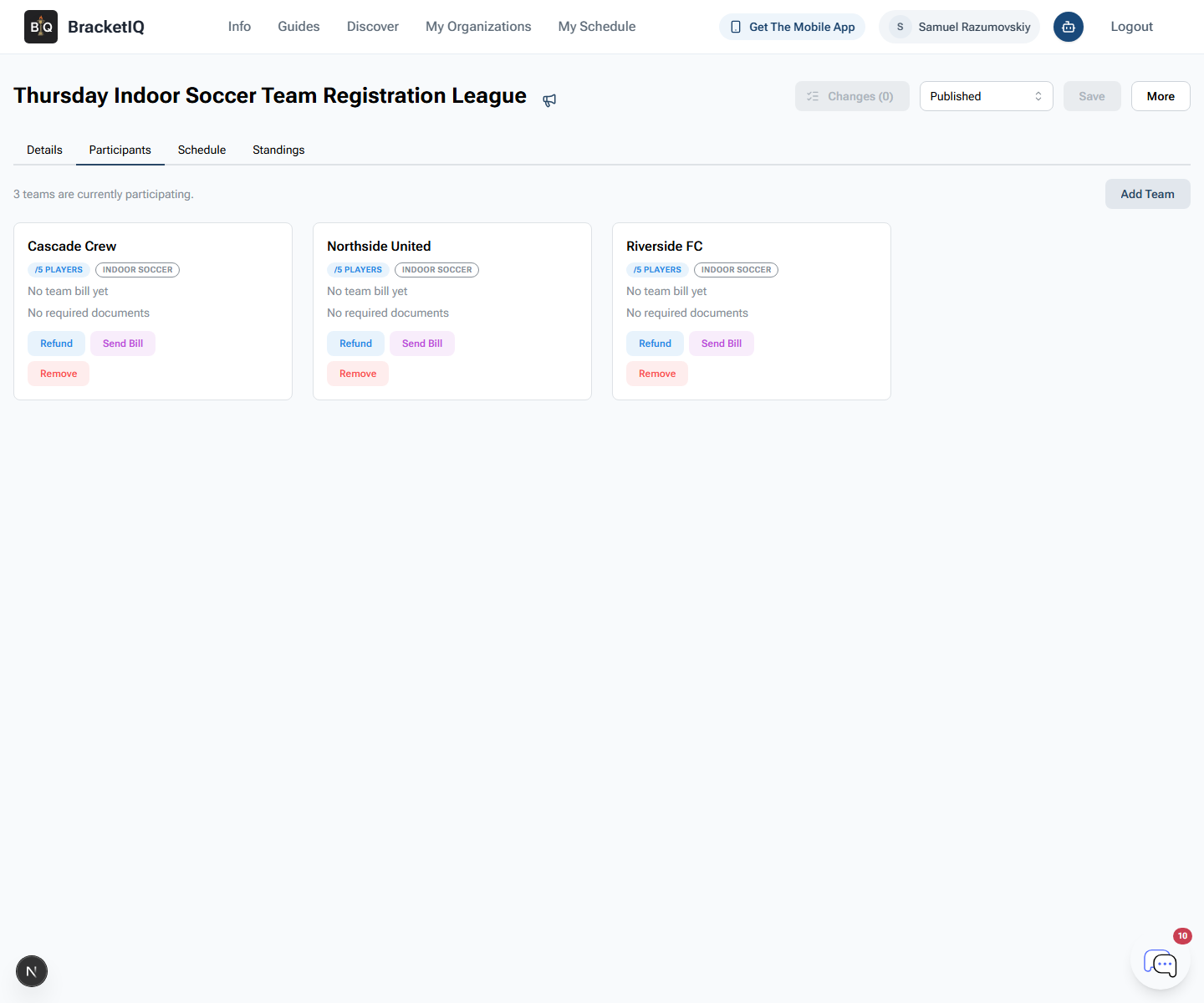
In this example, the organizer can see:
3 teams are currently participating.Cascade CrewNorthside UnitedRiverside FC- No team bill yet
- No required documents
- Refund, Send Bill, Remove, and Add Team controls
Use this screen before you finalize the weekly schedule. You should know which teams are active, which teams need payment follow-up, whether any required documents are missing, and whether late teams should be added manually.
Manual Add Team is useful for organizer-entered teams, late additions, or teams that paid outside the normal public registration path. Use Remove carefully because removing a team can affect capacity, bills, schedules, rosters, and captain expectations.
League registration checklist
Use this checklist before sharing the league link:
- Confirm Event Type is
League. - Confirm team registration is enabled.
- Set team size.
- Set the registration cutoff.
- Set the refund cutoff when refunds are allowed.
- Add required documents if teams or players must sign anything.
- Add at least one division.
- Set capacity for each division.
- Set the team price before publishing or sharing.
- Open the public page and verify the player-facing details.
- Test
View Team Options. - Confirm the paid join amount.
- Confirm the free-agent path if players without teams should have one.
- Review the Participants tab after teams start joining.
- Follow up on missing bills, documents, rosters, or team eligibility before scheduling.
League registration is the bridge between league creation and weekly league management. BracketIQ keeps the public signup page, captain team selection, free-agent interest, team list, billing actions, and organizer review connected so you can move into league management without rebuilding the season in a spreadsheet.