
Plan the volleyball format before opening registration
Indoor volleyball leagues work best when the format is clear before teams register. Decide whether the league is sixes, fours, coed, men's, women's, youth, adult, recreational, competitive, or split by skill level.

Photo by Oleksandr Plakhota on Pexels.
Set these basics before sharing the registration link:
- Team format and roster size.
- Number of divisions.
- Match length, sets, and scoring rules.
- Whether teams provide line judges, scorekeepers, or work teams.
- Court inventory and weekly time blocks.
- Playoff rules and qualifying team count.
- Registration price, capacity, and cutoff.
Use How to Create a League in BracketIQ for the base setup workflow. This article focuses on the indoor volleyball decisions that sit around that workflow.
Set league details for indoor volleyball
In BracketIQ, create the league under the right organization or host account, then set the sport, dates, registration rules, divisions, and league details.
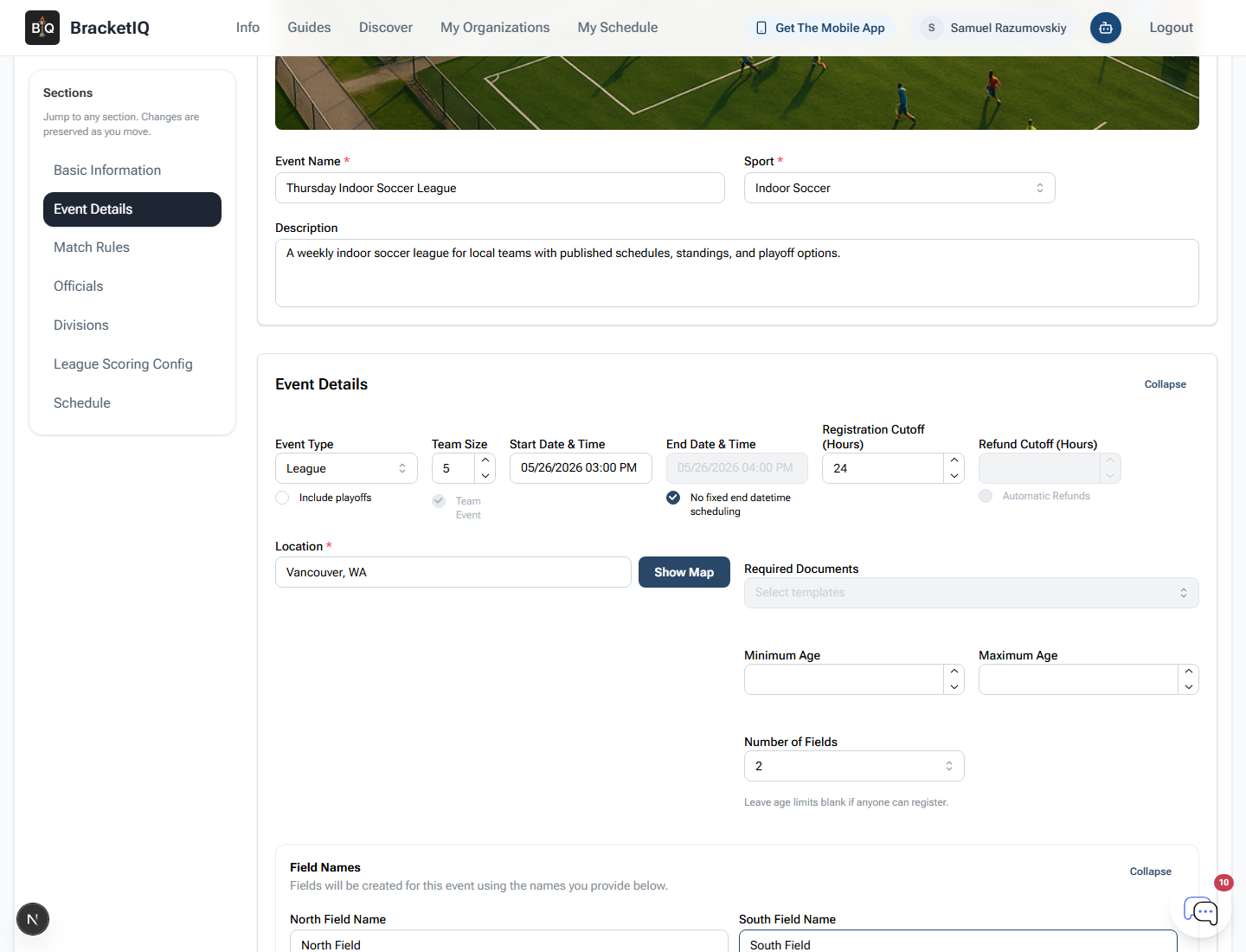
For indoor volleyball, pay special attention to:
Sport: choose volleyball so the event is discoverable and easy to understand.Divisions: separate competitive, recreational, coed, youth, or age groups when needed.Team registration: keep registration team-based so captains can register or select their team.Roster expectations: communicate minimum and maximum roster size before registration.Playoffs: decide whether playoffs are automatic, manual, or limited to top teams.
If your league has one open division, still create a division. BracketIQ uses divisions for capacity, price, team assignment, standings, and schedule behavior.
Build the weekly gym schedule
Indoor volleyball is usually constrained by gym time. Before generating the schedule, list every weekly court block the league can use.
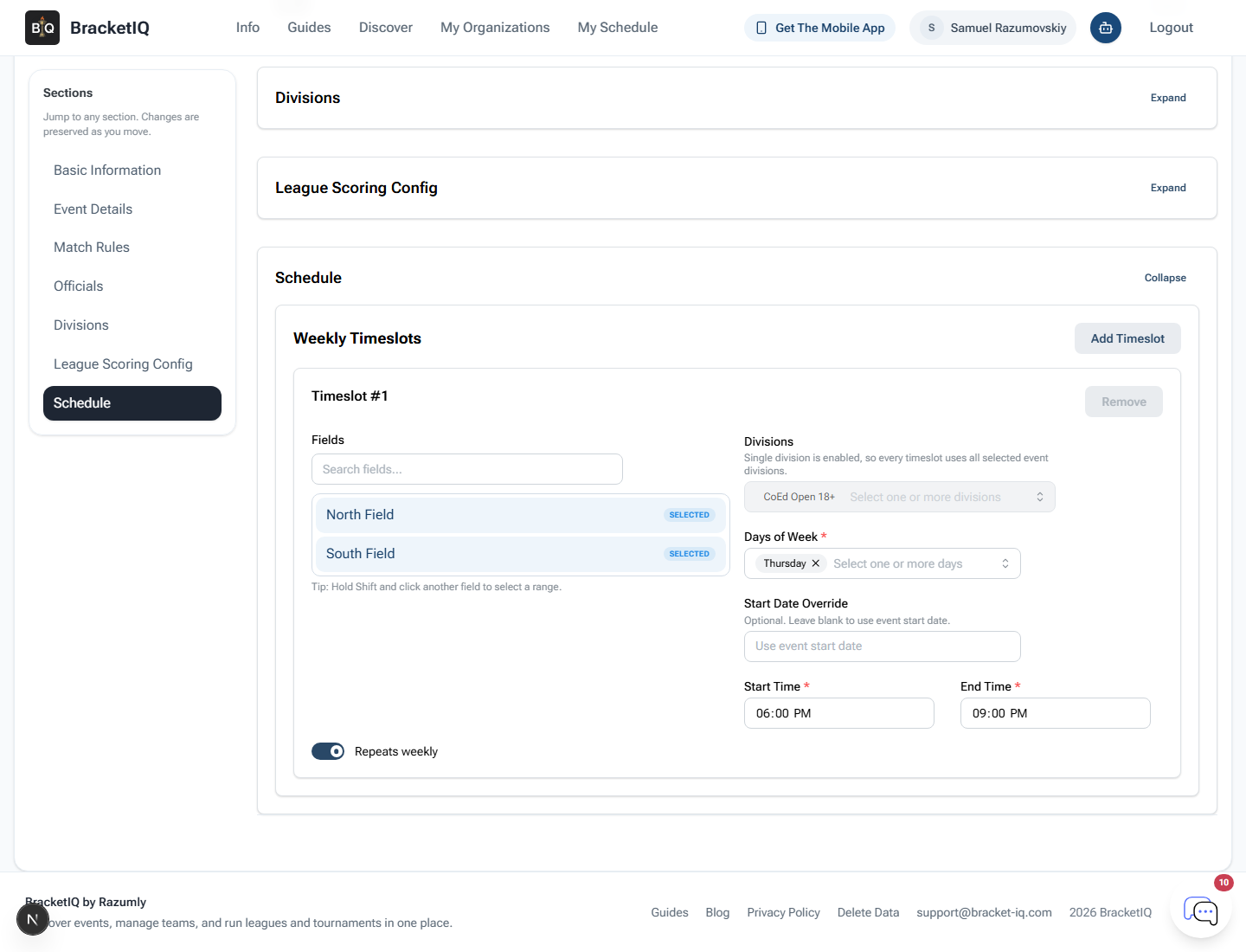
For volleyball facilities, check:
- Which courts are available each night.
- Whether courts are full-court volleyball, shared gym space, or converted basketball courts.
- Start times and match duration.
- Warmup time between matches.
- Whether one team stays to work the next match.
- Any blackout dates for school events, tournaments, maintenance, or holidays.
If the facility runs multiple sports, use How to Manage Multiple Sports at One Facility to keep volleyball blocks from colliding with soccer, pickleball, basketball, rentals, or other programming.
Review the schedule in Agenda view
After teams are registered and the schedule is generated, review the league in Agenda view.
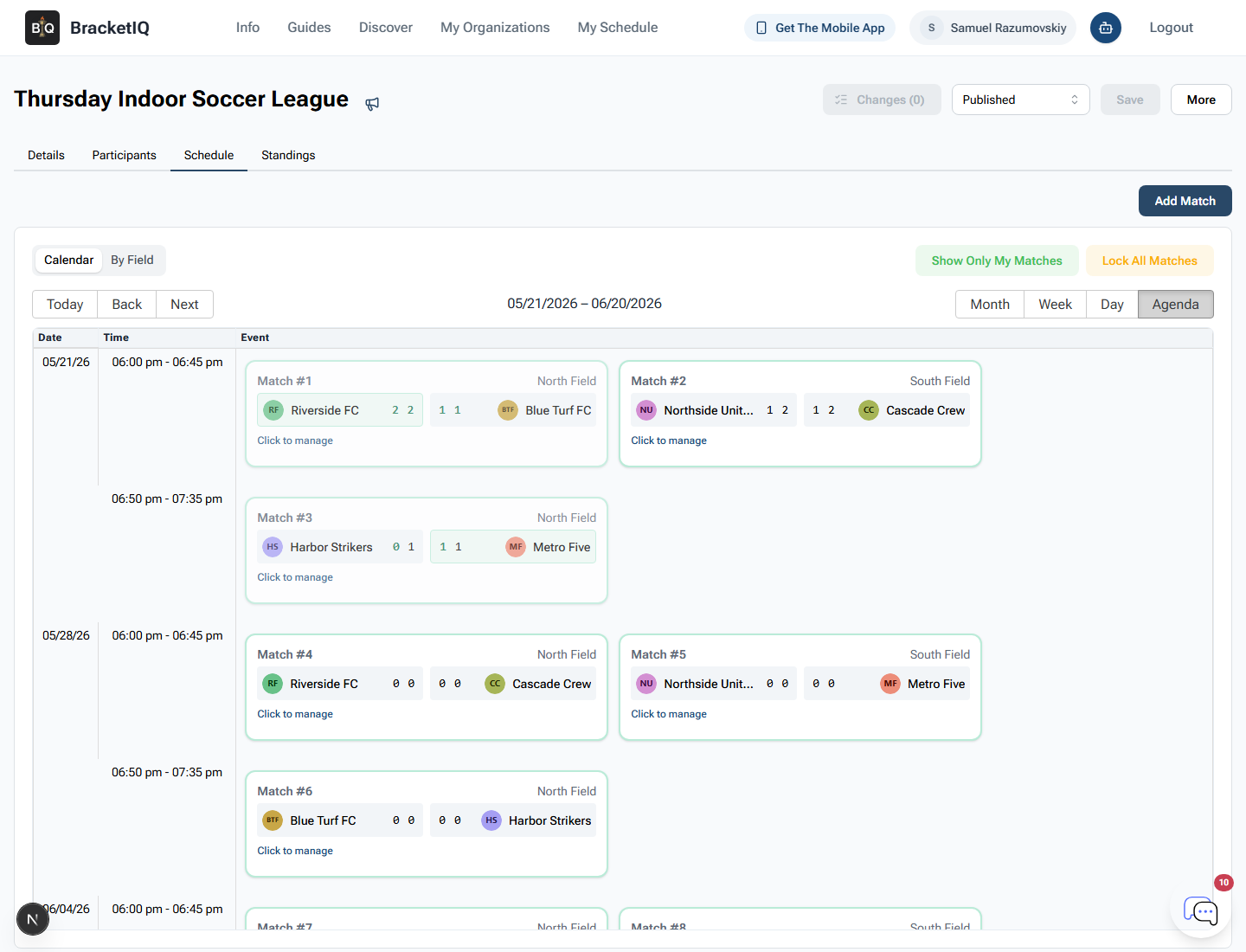
Agenda view is the best static review for indoor volleyball because it shows:
- Match order.
- Start times.
- Team names.
- Court assignments.
- Gaps between matches.
- The operational flow for staff and teams.
Check whether any team has impossible back-to-back assignments, repeated late starts, uneven court distribution, or conflicts with work-team duties.
For the full recurring schedule workflow, use How to Schedule a Multi-Week Sports League.
Track standings and playoff seeding
Once matches are being scored, review standings regularly so teams know where they stand and staff can catch issues before playoffs.
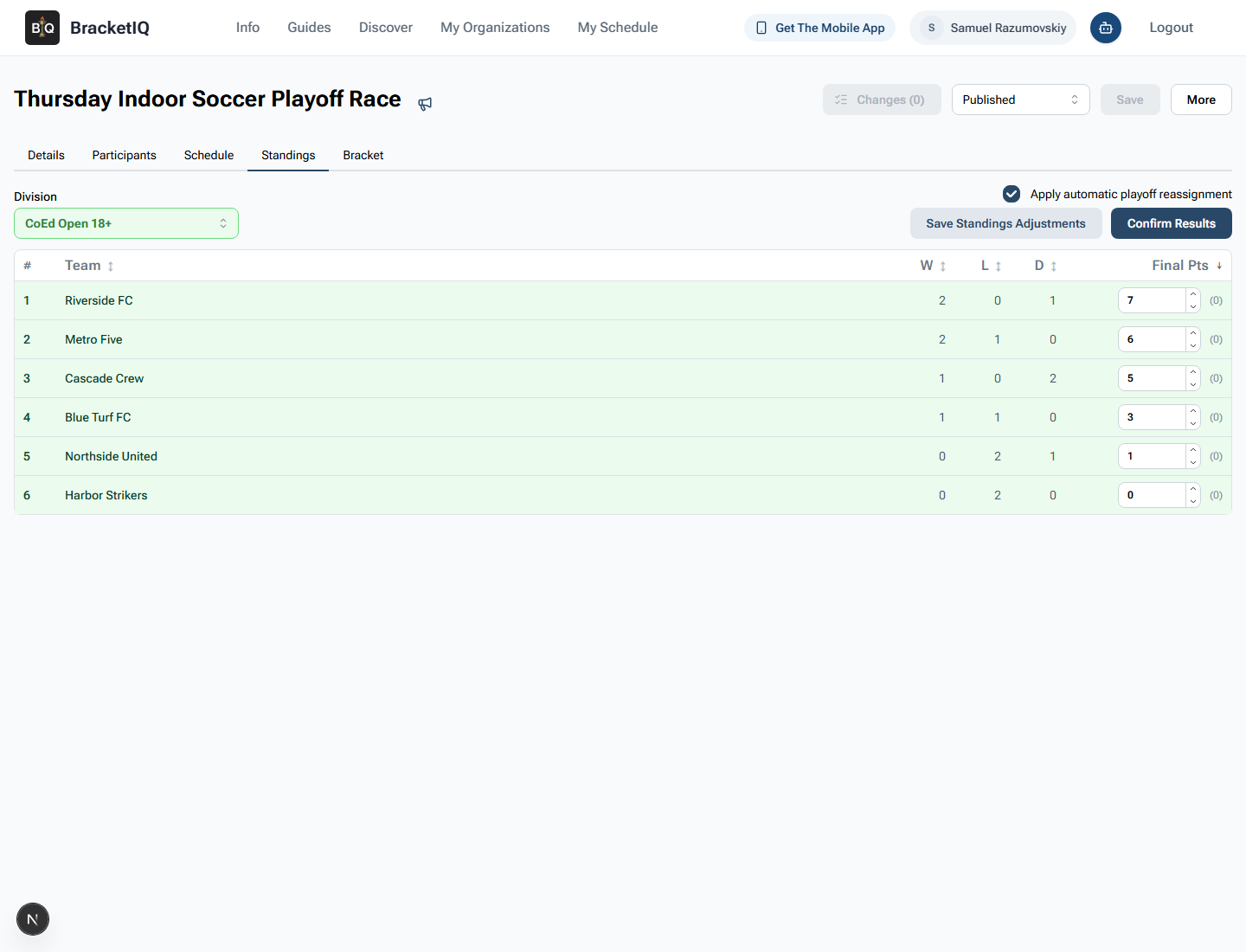
For indoor volleyball, decide how standings should handle:
- Match wins and losses.
- Set wins and losses.
- Points scored or point differential.
- Forfeits.
- Tiebreakers.
- Playoff qualification.
Use How to Manage League Standings and Playoff Seeding when the league is ready to confirm results and seed playoffs.
Communicate schedule changes quickly
Indoor volleyball schedules often change because of gym conflicts, weather-related building closures, school events, staffing issues, or team availability.
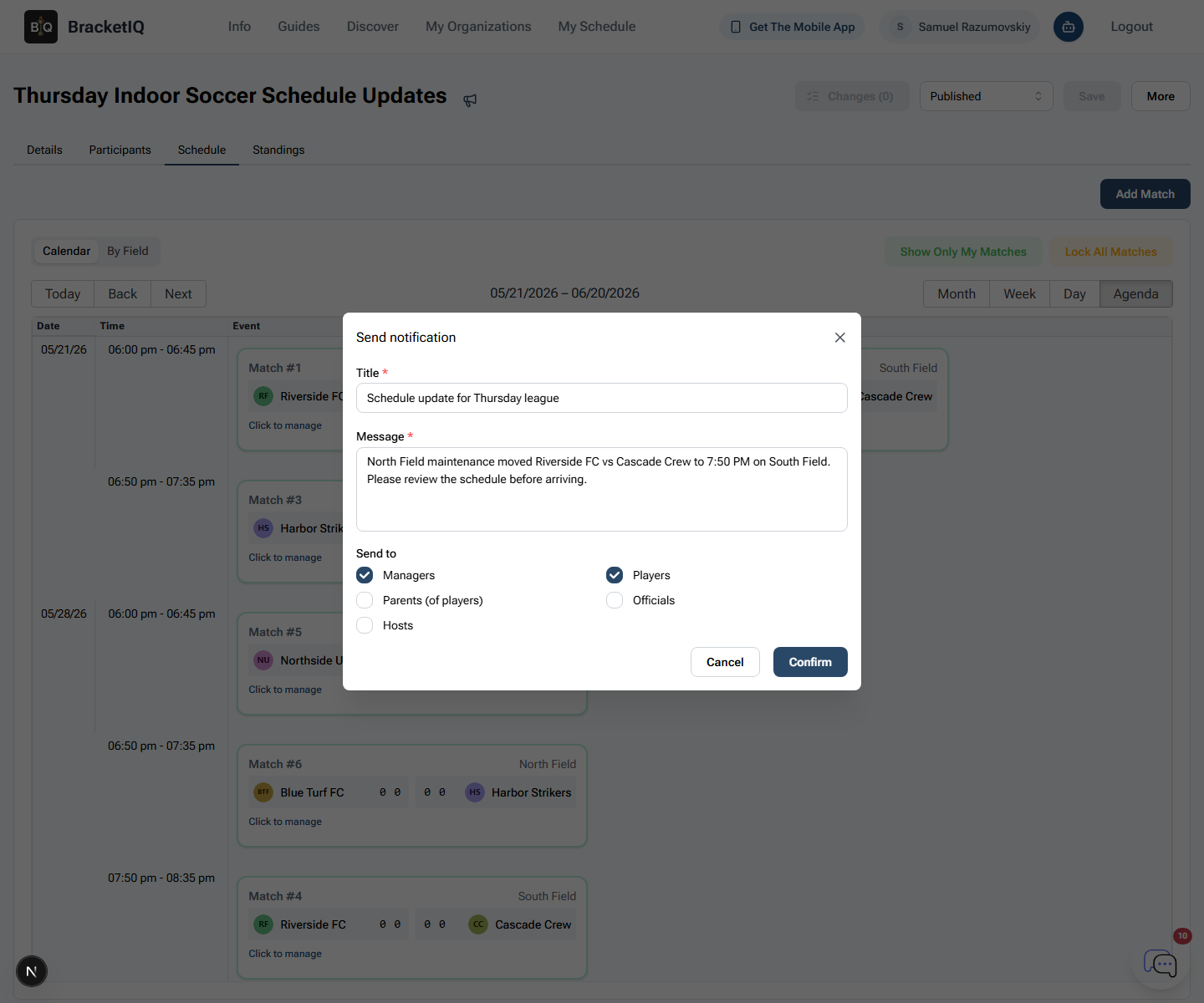
When something changes, tell teams:
- Which match or night changed.
- The new time and court.
- Whether work-team or officiating duties changed.
- Whether standings or playoff timing is affected.
- Where to check the updated schedule.
For a league-specific communication workflow, use How to Communicate Schedule Changes During a League Season.
Indoor volleyball league checklist
Use this checklist before launching an indoor volleyball season:
- Confirm team format, roster expectations, and division structure.
- Set team registration, price, capacity, and cutoff.
- Map gym courts and weekly court blocks.
- Decide scoring, standings, tiebreakers, and playoff rules.
- Communicate officiating, line judge, scorekeeping, or work-team expectations.
- Review registered teams before generating schedules.
- Check the schedule in Agenda view.
- Publish the public league page.
- Review scores and standings every week.
- Send schedule changes through BracketIQ so teams have one source of truth.
BracketIQ handles the league structure, registration, schedules, standings, playoffs, payments, public pages, and participant updates. The volleyball-specific work is making sure the court blocks, roster rules, match format, officiating expectations, and playoff rules match how indoor volleyball actually runs.